

Featured guides.
Set up your account
Create your login and see your orders.
View guide →Set up Lead Responder Lite
Copy your forwarding address and save your reply. Open the setup guide.
View guide →Connect your channels
Email and website forms. Facebook, Google, and chat are coming soon.
View guide →Read the quick start
Everything in 4 steps.
View guide →Get started in 4 steps.
Request a product
Choose Lead Responder Lite or Done-for-You Setup and send the short request form.
Share your form
Send us your quote form link. No code on your side.
Approve your reply
We send you the reply wording. Nothing goes live until you approve it.
Go live
We switch it on and email you. You can see the status in your dashboard.
Guides.
Set up your account
Sign in with a magic link sent to your email, a password, or Google. Your dashboard shows each order and its status: Requested, Pending payment, Active, In progress, Delivered, Cancelled.
Lead Responder Lite
You copy your forwarding address and save the reply. You connect the mailbox or form. You choose an address for alerts. Setup guide.
Done-for-You Setup
Send the request form with the task and the tools you use. We email a checklist and a written scope. After you approve it, delivery is usually within 1 business day.
Integrations
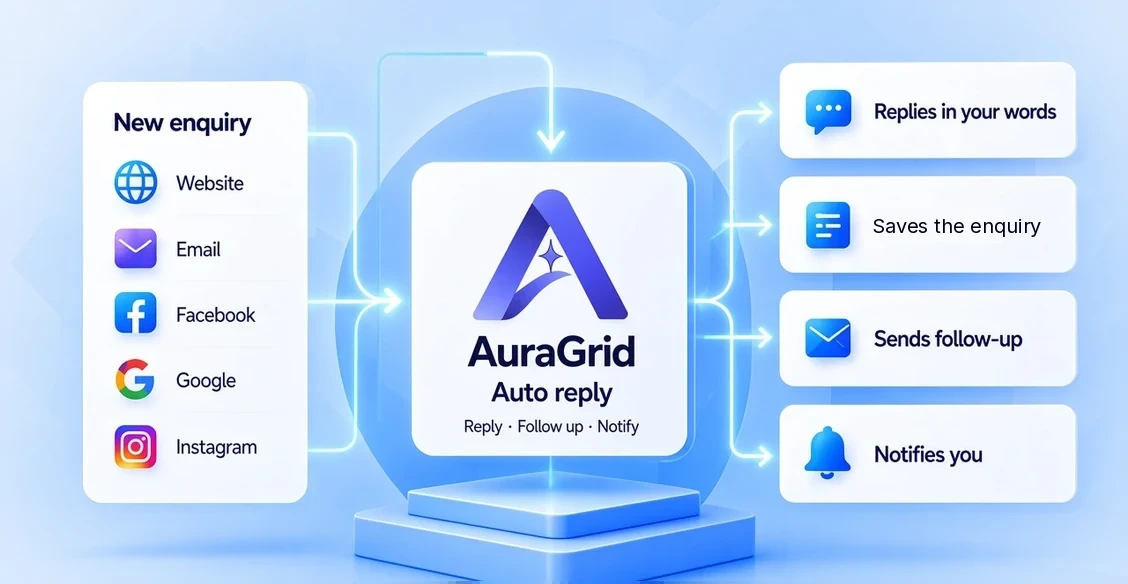
Email you already receive, and website forms that email you, can be connected. Facebook, Google, chat, and marketplaces are coming soon. Open the setup guide.
Troubleshooting
No reply sent? Open the setup guide and check the forwarding address. Reply went to spam? Ask your customer to mark it 'not spam'; we can't promise inbox placement.
Account & billing
Prices are in US dollars, and payments will be processed securely by Stripe once checkout opens. Cancel Lead Responder Lite by emailing billing@auragridlabs.com. See the Refund and Cancellation Policy.
Security & privacy
We never sell your data or your leads. See the Privacy Policy.
Quick answers to common questions.
How do auto replies work?
When a new enquiry arrives, your approved message is sent by email. It says it is automated.
Can I change my reply?
Yes. Email the new wording; it goes live after you approve it.
Do I need technical skills?
No.
How fast is setup?
Usually within 1 business day after the checklist.
Can I cancel anytime?
Yes. Monthly plans run month to month.
Which channels are supported?
Email you already get, and website forms that email you. Facebook, Google, and chat are coming soon. Setup guide.
Is my data safe?
We never sell it. See our Privacy Policy.
How do I contact support?
Email support@auragridlabs.com.

Still have questions?
A real person usually replies within 1 business day.